

You’re halfway through a meeting when your phone lights up with “Unknown.” You decline it. Ten minutes later, a number with your own area code rings. Sound familiar?
Spam calls have gone from an occasional nuisance to a daily interruption. Some come from pushy telemarketers. Others come from scammers fishing for bank details, passwords or a quick payment. That’s why learning how to stop spam calls is more useful than just learning to ignore them.
The quickest way to stop spam calls takes about five minutes: switch on your phone’s built-in spam filter, add your carrier’s free blocking app and register your number on the Do Not Call list. The sections below show exactly how, for iPhone, Android, Samsung and landlines, plus what to do about spam texts.
Why Am I Getting So Many Spam Calls and How to Stop Them
Short answer: your number is sitting in a database you never signed up for, and a machine is dialing it automatically. Knowing how it got there makes the fixes below easier to understand.
How Scammers Get Your Number
Data breaches are the biggest source. When a company gets hacked, customer phone numbers often end up for sale. Data brokers add to the pile by collecting details from store loyalty cards, online forms and public records.
Free apps play a part too. Some apps request permission to view your saved contacts and call history, potentially using that information for commercial purposes without your knowledge.
Then there’s the call itself. Pick up, even just to say “stop calling me,” and the dialer logs your number as a live line. Live lines sell for more, so the calls usually increase.
Why Some Calls Look Like They’re From Your Area Code
Scammers know you’re more likely to answer a local-looking number. Regulators have cracked down on faking caller ID, so many callers now buy thousands of cheap, real numbers and rotate through them. Each number looks clean to a filter because it hasn’t been reported yet.
The takeaway is simple. A familiar area code proves nothing.
Signs a Call Is Almost Certainly Spam
- A pause or faint click before anyone speaks
- A recorded voice, or one that sounds strangely scripted
- Urgent warnings that demand immediate action, such as “your account will be deactivated before the day ends.”
- A request for payment by gift card, crypto or wire transfer
- A caller claiming to be your bank, the IRS or Amazon about something you never started
How to Stop Spam Calls on Any Cell Phone: Quick Fixes
Before you open any settings, a few habits work on every phone and every carrier.
Let Unknown Numbers Go to Voicemail
Real people, like your dentist or a delivery driver, usually leave a message. Robocallers almost never do. If you answer an unwanted call and hear no one speaking or an automated message, end the call immediately without responding.
Ignore the “Press 1 to Opt Out” Prompt
There’s no real opt-out behind it. Those prompts exist to find numbers that respond.
Turn On Your Carrier’s Free Spam Filter
Carrier tools work at the network level, so they catch junk before your phone even rings. Download the one for your provider and switch it on:
- T-Mobile: Scam Shield
- AT&T: ActiveArmor
- Verizon: Call Filter
Join Your Country’s Do Not Call Registry
In the US, sign up free at DoNotCall.gov or call 1-888-382-1222 from the phone you want to register. Legitimate telemarketers must remove you from their lists within 31 days. Fraudsters may still contact numbers on the registry, meaning it mainly reduces legitimate telemarketing calls. If you’re in another country, check for a similar service offered by your local telecom authority.
How to Stop Spam Calls on iPhone
Apple gives you three layers: silence, screen and block. Menu paths below are for iOS 18 and later. On older versions, go to Settings > Phone directly.
Silence Unknown Callers in Settings
Open Settings, select Apps, tap Phone, choose Silence Unknown Callers, and enable the feature. Any number that isn’t in your contacts, recent outgoing calls or Siri Suggestions goes straight to voicemail. Nothing is lost, because those calls still appear in your Recents list.
This is the most restrictive setting, making it ideal for people who seldom receive calls from unknown numbers.
Use Call Screening and Live Voicemail
If you’d rather not silence everything, open Settings > Apps > Phone and look under Screen Unknown Callers. You can send numbers flagged as spam to voicemail, or pick Ask Reason for Calling so your iPhone questions the caller before it rings.
On iOS 17 or later, Live Voicemail adds a live transcript to your lock screen while the caller talks. If it’s a real person, you can pick up mid-message.
Block a Persistent Caller From Recents
Open the Phone app, tap Recents, tap the i icon beside the number and choose Block this Caller at the bottom.
You can also plug in outside protection. Open Settings > Apps > Phone > Call Blocking & Identification, then enable your carrier’s spam protection or activate a third-party app such as Truecaller or Hiya
How to Stop Spam Calls on iPhone Without Blocking Every Number
Some people can’t afford a hard block. A doctor’s office or a new client might call from a number you’ve never saved, and a strict filter could shut them out. The silencing and screening options above already stop short of blocking, so this section adds two softer ones and explains why blocking alone falls short.
Why Blocking One Number at a Time Fails
Blocking numbers can feel like an endless cycle. You might silence one caller today, only to receive another call from a different number tomorrow. It also offers little flexibility, since blocking completely cuts off contact.
Switch Carrier Apps to Label-Only Mode
The carrier apps mentioned earlier usually let you choose what happens to suspected spam. Look for the Spam Risk or Nuisance Calls setting and change the action from Block to Send to Voicemail or Identify Only. Your display may flag the call as “Potential Spam,” but you can decide whether to answer it.
Use Focus Mode to Allow Only Contacts
For a sudden wave of calls, Focus gives you temporary quiet. Swipe down to open Control Center, tap Focus and choose Do Not Disturb. Then long-press it, go to People > Allow Calls From and select Contacts Only.
Your contacts ring through as normal. Everyone else is silenced, not blocked, and can still leave a voicemail. Switch it off whenever you like.
How to Stop Spam Calls on Android
Most Android phones, including Pixel, Motorola, OnePlus and Xiaomi, use Google’s Phone app. Samsung has its own system, covered in the next section.
Turn On Caller ID and Spam Protection
- Open the Phone app.
- Tap the three-dot icon located in the top-right corner.
- Open Settings and tap the Caller ID and spam option.
- Turn on See caller & spam ID.
- Turn on Filter spam calls.
The first toggle labels businesses and known spam numbers. The second stops suspected junk from ringing at all.
Let Call Screen Handle Unknown Callers
On Pixel phones, Call Screen lets Google Assistant answer for you, ask who’s calling and show you a live transcript. It’s a good middle ground between blocking and picking up blind.
Report and Block Repeat Offenders
When a spammer slips through, open Recents, long-press the number and choose Block/Report Spam. Submitting a report also helps Google identify spam and safeguard other users.
If you want to cut off hidden numbers entirely, go to Settings > Blocked numbers and turn on the option for unknown or unidentified callers. One warning: hospitals and some doctors’ offices call from private lines, so this can block calls you actually need.
How to Stop Spam Calls on Samsung Galaxy
Samsung uses Smart Call, which is powered by Hiya’s spam database.
Switch On Smart Call
- Open the Phone app and tap the three dots.
- Go to Settings > Caller ID and spam protection.
- Turn the main toggle on.
- Open the spam and scam call settings, then choose your preferred protection level.
You’ll see two choices. Blocking spam and scam calls helps provide the highest level of protection. Only block high-risk scam calls lets mild telemarketers through while stopping known fraud.
Screen Calls With Bixby Text Call
On supported models, open Phone > three dots > Settings > Bixby Text Call and turn it on. When an unknown number rings, tap the Bixby button. It answers, asks who’s calling and shows you their reply as text, so you can decide whether to talk.
Block Hidden Numbers and Repeat Callers
Samsung places its call-blocking options in Settings > Block numbers. Turn on Block calls from unknown numbers to reject hidden or restricted caller IDs (the same hospital-line caveat applies). To auto-reject a specific number, add it on the same screen. A faster route for a single caller is Recents > tap the number > i icon > Block.
How to Stop Unwanted Calls on Landline Phones
A landline has no built-in AI, so protection comes from your phone provider or from hardware.
Why Landlines Get Hit Harder
Landline numbers tend to be old, and old numbers show up in public directories and long-circulated lists. There’s also no app quietly filtering in the background. The ring is all you get.
Services Your Phone Provider May Already Offer
Call your provider or check your online account for these:
- Anonymous Call Rejection: blocks anyone who hides their caller ID. On most traditional lines you dial *77 to turn it on and *87 to turn it off.
- Robocall filtering: Services offered by providers like Comcast Xfinity may include tools such as Nomorobo for VoIP landlines. These help identify automated calls by verifying callers or blocking recognized spam numbers.
Call Blocking Devices Worth Buying
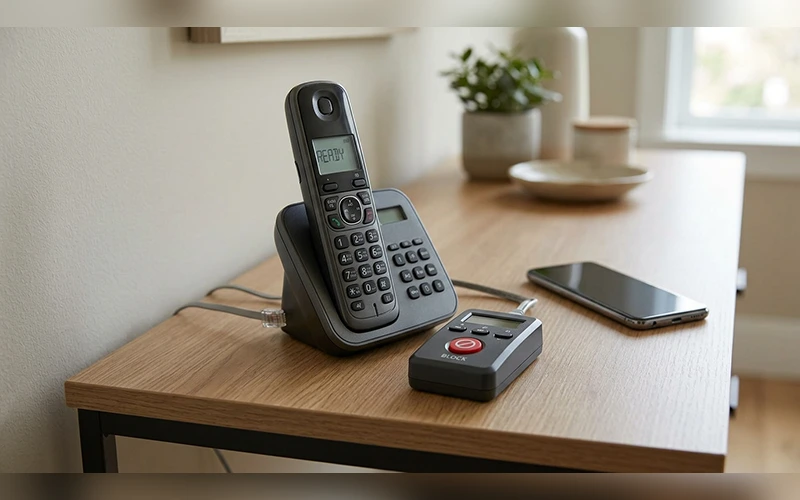
On a traditional copper line, a call blocker plugs in between the wall jack and your phone. Devices like the CPR Call Blocker come loaded with thousands of known scam numbers. When a new one gets through, you press the red Block button and that number never rings again. Some models also let you whitelist approved callers and silence everyone else.
If you plan to upgrade your phones, consider a cordless model with an integrated call-screening feature from manufacturers such as AT&T or VTech. The system prompts unfamiliar callers to identify themselves through a recorded message before connecting. Most automated callers disconnect during this step, preventing your handset from ringing.
How to Stop Spam Calls and Texts Together
Scammers use both channels, but each one needs its own setting.
Spot a Scam Text Before You Tap
Watch for a failed package delivery you never ordered, a bank alert with a strange link, or a prize you didn’t enter to win. Shortened links and odd sender numbers are red flags. Don’t tap and don’t reply, even with “STOP,” if you don’t know the sender.
Report Spam Texts to Your Carrier
Forward the message to 7726 (it spells SPAM). It costs nothing, supports several major carriers, and allows users to block unwanted callers.
You can submit spam reports directly through your messaging app as well. On an iPhone, select Report Junk below the message. On Android, tap and hold the message thread, then choose the option to block the sender and report it as spam.
Filter Unknown Senders on iPhone and Android
- iPhone: Go to Settings > Apps > Messages and turn on Filter Unknown Senders. People outside your contacts move to a separate tab with notifications off.
- Android: In Google Messages, tap your profile icon, then Messages settings > Spam protection and switch on Enable spam protection. It hides shady links and scam texts automatically.
Best Spam Call Blocker Apps Compared
The built-in tools cover most people. If you want something stronger, these four are the ones worth a look.
| App | Platform | Cost | Best for |
| Truecaller iOS | iPhone, Android | Free ad-supported option, paid premium plan | Extensive caller identification powered by users |
| Hiya | iPhone, Android | Free, premium tier available | Clean caller labels and spam warnings |
| RoboKiller | iPhone, Android | Subscription | Aggressive blocking of persistent robocallers |
| Nomorobo | iPhone, Android, VoIP landlines | Free for VoIP landlines, subscription for mobile | Covering a mobile and a landline together |
Pricing and plans change often, so check each app’s store page before you commit.
What to Do If You Already Picked Up or Shared Info
Picking up a spam call isn’t a disaster. Handing over personal details is a different story, and speed matters.
Steps to Take in the First Hour
- Hang up and don’t call the number back.
- Change the password on any account you mentioned, plus any other account that uses the same one.
- Turn on two-factor authentication for your email and banking apps.
- Write down the number, the time and what the caller said.
- Report it at ReportFraud.ftc.gov.
When to Contact Your Bank
Call your bank right away if you gave out a card number, account details or a one-time code, or if you sent money. Use the number printed on the back of your card, not one the caller gave you. Ask them to freeze or replace the card and review recent transactions. If you paid with gift cards, contact the card issuer too, since quick action sometimes recovers funds.
Common Mistakes That Make Spam Calls Worse
- Installing several blocker apps at once. They can conflict with each other. Pick one and stick with it.
- Posting your number publicly. Social profiles, classified ads and business listings feed scrapers.
- Using one number for everything. Keep a secondary number, such as a free Google Voice line, for sign-ups and online forms.
- Skipping system updates. Spam protection on iOS and Android improves through updates.
- Never checking silenced calls. Legitimate calls from medical offices or delivery services may go unanswered, so check your recent call history daily.
Final Thoughts
No single setting ends spam calls, but layers add up. Pick the section for your phone, finish that setup tonight and add one more layer this week. Within a couple of weeks, your phone should be much quieter.
Frequently Asked Questions
Do spam calls ever stop completely?
Rarely. Most people see a big drop within a few weeks of combining a phone filter, a carrier app and a registry sign-up, but a few will always get through.
Can a real call get flagged as spam by mistake?
Occasionally. Filters work from reports and patterns, so a new clinic line or a small business can get caught. Mark the call as not spam from your Recents, or save the number to your contacts so it rings through next time.
Are robocalls legal?
In the US, sales calls with a prerecorded voice are generally illegal unless you gave written permission. Many robocalls break that rule, which is why reporting them matters.
Is it safe to call back a missed number?
Not if you don’t recognize it. Some scams use a single ring to bait you into calling a premium-rate line. If you think the call might be genuine, look up the company’s official number and contact them directly.
Can a spam call hack my phone?
Answering or ignoring a call won’t infect your phone. The danger comes afterward: tapping a link in a follow-up text, installing an app the caller recommends, or reading out a verification code.
Are spam blocker apps safe to use?
Reputable ones are, but they do need access to your call data to work. Stick to well-known apps, download them only from the official App Store or Google Play, and skim the privacy policy before you grant permissions.
Should I change my phone number?
Only as a last resort. A new number means updating your bank, your email recovery settings and every contact who has your old one. If you do switch, share the new number sparingly and keep it off public forms and profiles.
Why do I get spam calls at odd hours?
Automated dialers run around the clock, and some call centers operate in other time zones. They don’t care what time it is where you are. A scheduled Do Not Disturb that mutes everyone outside your contacts overnight takes care of it.
For more articles like this, visit our site: https://factbreaker.com/