
Most people who search for how to activate Windows 10 for free land on pages pushing a “one-click activator,” and those downloads are a quick way to infect a clean PC.
Microsoft does not give away product keys, so a legal free activation means using a license you already have or one your school or employer provides. You may well own one without knowing it. This guide covers those routes, the correct way to use CMD, and the move to Windows 11.
What Windows Activation Does
Activation is Microsoft’s way of confirming that your copy of Windows is genuine and installed on a single device. Once it is verified, the operating system unlocks personalization options and stops showing reminders. The check happens quietly through your product key or a digital license stored on Microsoft’s servers.
Can Windows 10 Run Without Activation?
Yes, Microsoft allows it. If you are wondering how to activate Windows 10 for free without product key, the honest answer is that skipping the key during setup does not activate anything.
Windows simply runs in a limited state, with a small watermark in the corner and a locked Personalization page, so wallpapers and accent colors stay on their defaults. Everything else, from browsers to games, works as usual.
Check Your Current Status in Settings
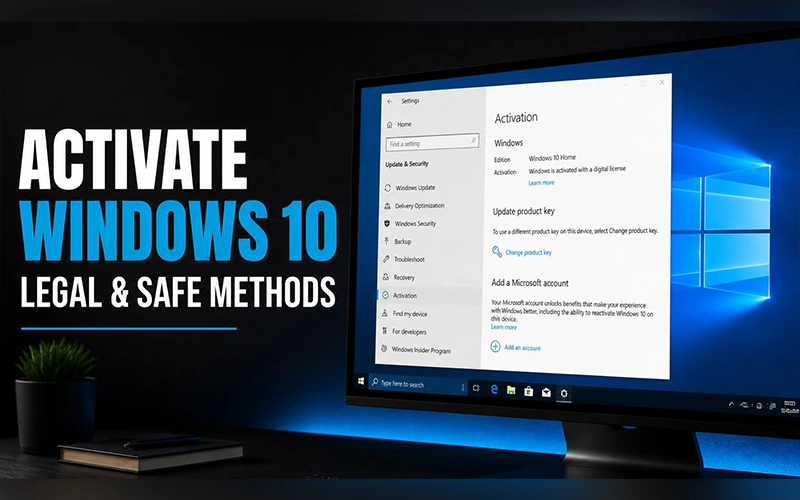
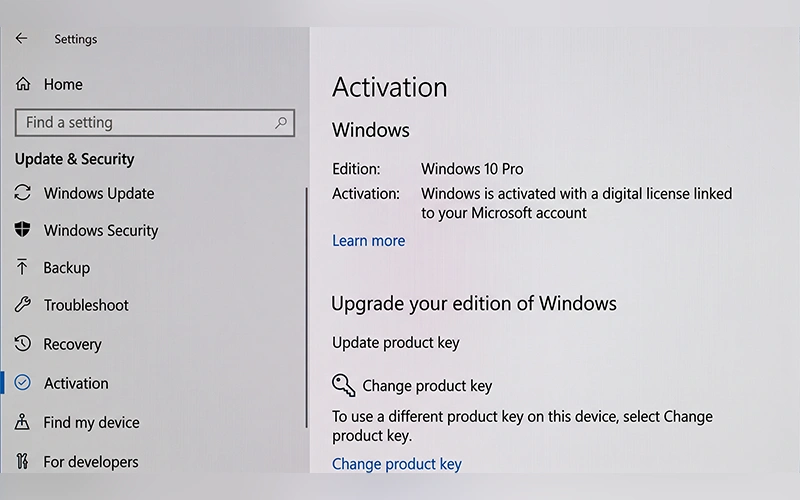
Before trying anything else, open Settings, go to Update & Security and select Activation. The page tells you whether Windows is activated and whether it is linked to a digital license or a Microsoft account. If the page says Windows is activated, a restart usually clears a lingering watermark.
Use the Digital License Already on Your PC
If the machine ever ran a genuine copy of Windows 7, 8 or 10, Microsoft probably has your hardware profile on record. Connect to the internet and open the Activation page again, and Windows will often validate itself without asking for anything.
For more details, follow Microsoft’s official guide to activating Windows.
This is also the best answer to how to activate Windows 10 for free permanently, because the license is tied to your hardware instead of a code you could lose, and it does not expire.
If you are reinstalling, choose I don’t have a product key during setup and select the same edition you had before, such as Pro instead of Home. Activation then completes on its own after the first online check.
Owners of an old retail key from Windows 7 or 8 can also try it under Change product key, because Microsoft’s official free upgrade offer ended in 2016 but genuine keys from those versions are sometimes still accepted.
Fix Activation Issues After Hardware Changes
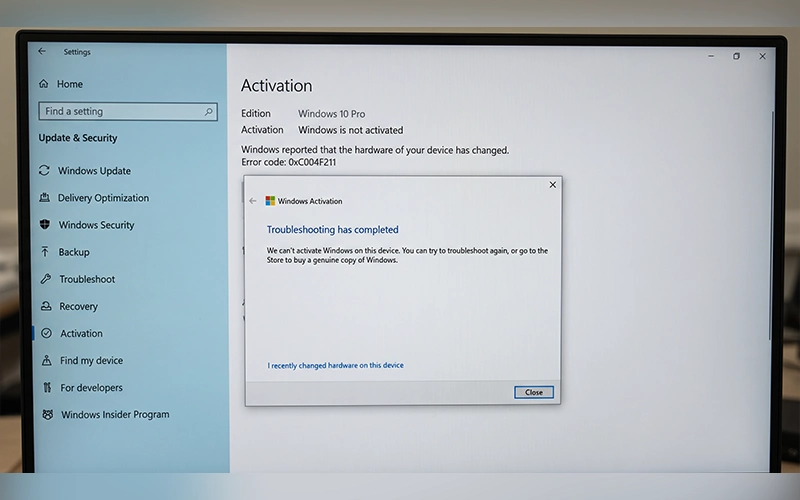
Replacing a motherboard can make Windows see your PC as a new device. If your license was tied to a Microsoft account, click Troubleshoot on the Activation page and choose the option saying you changed hardware recently. Sign in, pick your device from the list and select Activate. Microsoft then moves the license to the new configuration.
This only works if the license was linked beforehand, so sign in with a Microsoft account under Settings > Accounts > Your info while Windows is still activated. The Activation page should then say the digital license is linked to your account.
Do You Need a Password for Any of This?
People often ask how to activate Windows 10 for free without password, and the confusion usually comes from mixing up two things. Activation has nothing to do with your login password.
The Settings route and the troubleshooter work without typing a key, though changing system settings may still ask for an administrator account. Scripts that promise a no-password trick hit the same wall, because they need administrator rights to run at all.
Free Licenses from Schools and Employers
This is the most overlooked legitimate route. Many universities give students access to Windows through the Azure Dev Tools for Education portal or their IT desk.
Some companies include a Windows license in their volume agreements, and employees can request it. For anyone researching how to activate Windows 10 for free legally 2026, these two sources are worth checking first, since they cost nothing and carry no risk.
Get Windows 10 Enterprise Free for 90 Days
If you only need Windows for a short time, Microsoft’s Evaluation Center offers Windows 10 Enterprise 22H2 and LTSC 2021 as free 90-day trials. You need a Microsoft account to register.
Microsoft intends the trial for IT testing, so use it for evaluation or short-term needs only. It is not a permanent activation, and the installation cannot be uninstalled later, so back up your data first and plan to move to a licensed edition before the 90 days end.
Using CMD the Right Way
Command Prompt is a perfectly legitimate tool when it is used with a license you actually own. Here is how to activate Windows 10 with CMD using a genuine key:
- Search for cmd in the Start menu, right-click Command Prompt and choose Run as administrator.
- Type
slmgr /ipk YOUR-25-CHARACTER-KEYand press Enter. - Type
slmgr /atoto contact Microsoft’s activation servers.
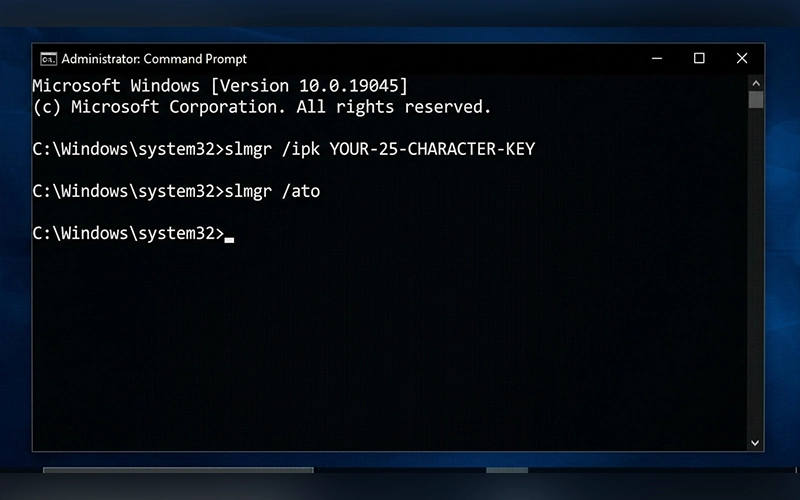
A pop-up confirms success or shows an error code. To confirm the result, slmgr /dli shows a short summary, slmgr /dlv reveals whether the license is Retail, OEM or Volume, and slmgr /xpr shows when it expires. A retail or OEM license reports that the machine is permanently activated.
Why Public KMS Scripts Are a Bad Deal
Many forums teach how to activate Windows 10 for free with CMD by pasting generic keys and pointing Windows at a stranger’s server. That setup is built for companies with their own licensed KMS host, not for home PCs.
It sends your licensing traffic to a server you cannot vet, and the activation lapses after 180 days unless it renews. Using it also breaks Microsoft’s license terms. Many of these scripts also ask you to switch off antivirus first, which is your cue to stop.
Moving to Windows 11 Pro
Windows 10 reached end of support on October 14, 2025, so it no longer gets new features or routine fixes. Microsoft’s Extended Security Updates program still supplies critical security patches, and its support page was updated in mid-2026 to list coverage through October 12, 2027. Check Settings > Windows Update for the current terms.
Upgrading is the better long-term move if your PC meets the requirements, which include TPM 2.0, Secure Boot and a supported processor. Follow our guide on [installing Windows 11 on a PC or laptop step by step] to learn how to upgrade your system. A PC with a valid Windows 10 Pro digital license generally carries it over to Windows 11 Pro at no cost. Open Settings, go to System and Activation, and run the troubleshooter if it does not activate on its own. Back up your files before upgrading, because Windows 11 only lets you roll back for 10 days.
If you do need a new license, here is how to activate Windows 11 Pro: open the same Activation page, click Change product key, enter the 25-character code and select Next. The CMD commands shown earlier work here too.
A genuine Windows 11 Pro activation key comes from the Microsoft Store, an authorized retailer, or your school or employer. If you are on Home, the Store upgrade under Settings > System > Activation attaches the Pro license to your Microsoft account. Keys sold for a few dollars on auction sites are usually leaked volume codes that Microsoft blocks later.
If your PC shipped with Pro, open PowerShell as administrator and run (Get-CimInstance -Query "SELECT OA3xOriginalProductKey FROM SoftwareLicensingService").OA3xOriginalProductKey to read the key embedded in the firmware. The older wmic command is disabled by default on recent Windows 11 versions.
Common Activation Errors and Quick Fixes
- 0xC004F050: Windows rejects the key as invalid. Verify the spelling and confirm the key matches your Windows version, Home or Pro.
- 0x803F7001: No valid license was found. Run the troubleshooter or enter a key manually.
- 0xC004C003: The key is blocked, which often points to a counterfeit seller. Contact the vendor or buy a fresh key.
- 0x80072EE7: Windows cannot reach the activation servers. Verify your network, VPN and firewall settings before running slmgr /ato again.
- 0x8007232B: Windows cannot find a KMS host, which mostly affects work-managed PCs. Ask your IT admin.
Final Thoughts
The safest free options are simple: let your existing digital license do its job, transfer it with the troubleshooter after hardware swaps, or ask your school or workplace. If none of those apply, running Windows unactivated beats installing a tool that compromises your files. And when you are ready to pay, one genuine key is cheaper than recovering from malware.
Frequently Asked Questions
Is it illegal to use Windows 10 without activating it?
No. Running an unactivated copy is allowed. Legal trouble starts with cracks, key generators or unofficial activation servers.
Can I change my wallpaper on unactivated Windows 10?
Yes, with a workaround. Right-click any image in File Explorer and choose Set as desktop background, since only the Settings page is locked.
Will a digital license survive a clean install?
Yes. Windows re-links it automatically once the PC goes online.
Is it safe to activate Windows with CMD?
Yes, if you use a legitimate key with slmgr /ipk. The risk arises only when you connect it to untrusted servers.
Can I use one Windows key on two PCs?Moving to Windows 11 Pro
A retail license can be transferred to a different PC after removal from the previous one. OEM licenses remain linked to the original device.
Can a Windows 10 product key activate Windows 11?
Usually yes. A valid Windows 10 Home or Pro key activates the matching Windows 11 edition.
Can Windows 10 users upgrade to Windows 11 without paying?
Yes, if your computer meets the required specifications. Use the PC Health Check app to confirm whether your device is eligible.
Is it possible to activate Windows while offline?
Yes, if you have a valid retail or OEM key. Press Windows + R, enter slui 4, select your region, and complete the phone activation process.
For more articles like this, visit our site: https://factbreaker.com/