




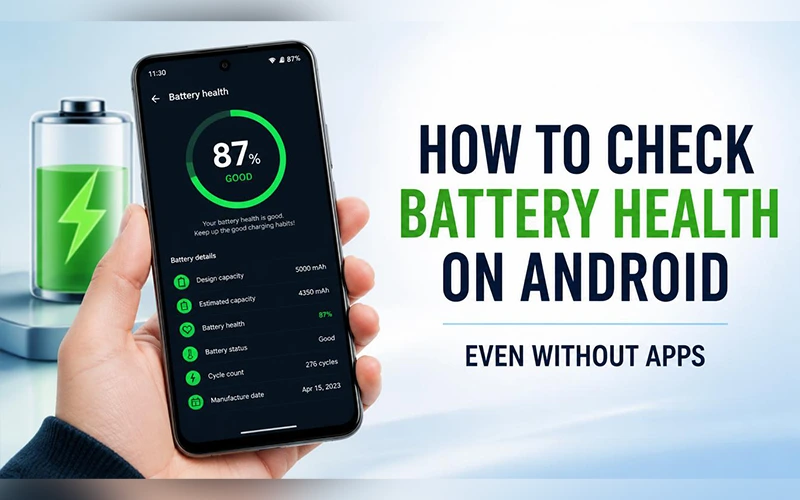
Last year your phone lasted all day without complaint. Now it’s asking for a charger by mid-afternoon, and you can’t tell whether the battery is worn out or you’ve simply been using it harder. Guessing won’t settle that. Learning how to check battery health on Android gives you a real figure, or at least a clear status, so you can decide between changing your habits and paying for a new cell. No single menu works on every handset, so this guide covers every method that works, from built-in screens and dialer codes to developer logs and trusted apps, and shows you how to read the result.
Why Battery Health Deserves Your Attention
Every lithium-ion battery loses a little capacity with each full charge and discharge. Battery health is the share of the original capacity that remains. As that share drops, you get shorter screen time and, on some models, throttled performance to keep the weaker cell stable. Most people type “how to check battery health on Android phone” into Google only after something goes wrong. Checking earlier helps you tell a tired battery apart from a software problem, which can save you from replacing a phone that only needed a new cell.
Signs Your Battery Is Wearing Out
Your phone often shows early signs of a problem before you run any diagnostic test:
- The percentage falls quickly, even during light use.
- The phone shuts off when it still shows 20 or 30 percent.
- The back gets warm while you’re only scrolling.
- Charging takes noticeably longer than it used to.
- The back panel bulges or the screen lifts at the edges. Stop charging the phone and have it inspected promptly.
If two or more of these sound familiar, here is how to check battery health on Android and confirm what’s going on.
Samsung Galaxy Diagnostics
If you’re curious about how to check battery health on Android Samsung models, the built-in diagnostics tool is the most dependable place to start.
- Open Settings and tap Device care (it’s called Battery and device care on some One UI versions).
- Scroll down to Diagnostics and choose Phone diagnostics.
- Tap Battery status and let the quick test finish.
The Life reading should say Good or Normal. If it says Action required, the battery needs replacing. The Capacity line shows the typical capacity in mAh. The same test also lives in the Samsung Members app under Support > Phone diagnostics, which helps if the Settings route is missing on your version. Some newer Galaxy models on recent One UI versions also show a health percentage and cycle count under Settings > Battery > Battery information, though the rollout is uneven, so you may not see it.
Checking Without Installing Anything
Plenty of people would rather keep their storage clean, and they often ask how to check battery health in Android without app downloads. Two routes work.
Native Battery Health Screens
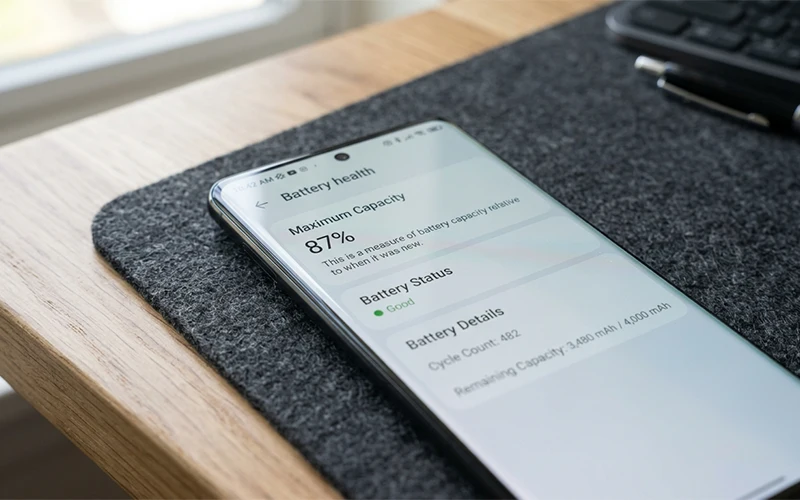
Some recent Pixel, Motorola, OnePlus and Honor updates add a dedicated battery health page. Open Settings > Battery and look for Battery health, or tap More battery settings first on certain brands. A few phones also list a status under Settings > About phone > Battery information. When a percentage appears, it shows your maximum capacity compared with a new battery, and many of these pages list the charge cycle count too.
Pulling the Number from a Bug Report
This takes a few minutes, but it gives you actual capacity figures. It’s also the fallback for older phones: if you’re trying to work out how to check battery health on Android 11 and nothing useful shows up in settings, this is your best bet.
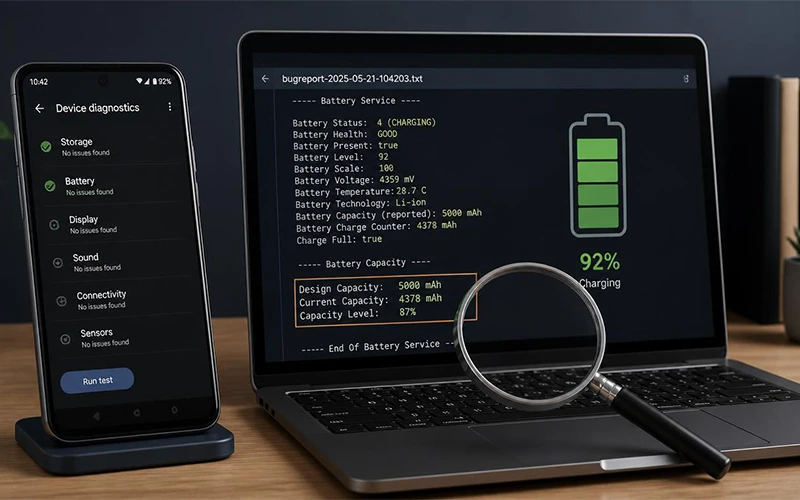
- Open your phone’s Settings, navigate to About phone, and locate the Build number entry. Tap it seven times in succession to enable Developer options.
- Open Settings > System > Developer options and choose Take bug report, then Interactive report.
- Wait for the “Bug report captured” notification and tap it to save the file to Drive or Files.
- Extract the zip file if the report saved as one, open the text file inside, and search for charge_counter or battery_health. Field names differ between brands, but you’re looking for the current capacity sitting next to the original design capacity.
Using Secret Dialer Codes
The Android battery health check code most people try first is *#*#4636#*#*. Type it into the Phone app and a Testing menu should open. Tap Battery information to see a status line, which usually reads Good or Unknown. Many manufacturers have disabled this menu, so don’t be surprised if nothing happens.
Stick to the codes listed here, because a few codes circulating online trigger a factory reset. A couple of brand-specific codes are worth a try:
- Samsung:
*#0228#opens the BatteryStatus screen with live voltage and level readings. It’s handy, though it won’t give you a health figure. - OnePlus, Oppo and Realme:
*#808#opens a hardware test menu.
Xiaomi uses its own code, which is covered in the next section.
Steps for Redmi, POCO and Xiaomi Phones
Redmi and POCO phones run the same software as Xiaomi’s own, so one set of steps covers all three. If you’re wondering how to check battery health Xiaomi has built in, the answer depends on whether your phone runs HyperOS or older MIUI.
On HyperOS and other recent builds, open Settings > Battery > Battery protection (some regions label it Battery health). It shows the overall condition along with your charge cycle count.
On some older MIUI releases, enter ##6485## in the Phone app to access the battery information menu. MB_06 shows the health condition, MF_05 shows the current capacity in mAh, and MF_06 shows the factory design capacity.
If your carrier or region blocks that code, there’s a log-based alternative. Go to Settings > About phone > Detailed info and specs, then tap CPU five to seven times to trigger a bug report. Give it about two minutes, then open File Manager > MIUI > debug_log and extract the zip file. Search bugreport.txt for Last learned battery capacity to see the remaining mAh.
Newer Android Versions vs Older Ones
People ask how to check battery health on Android 14 because that’s roughly where things started to change. Android 13 and older rarely have a built-in page, which is why dialer codes, bug reports and apps still matter there. Even on newer versions the option depends on the model, so a missing page doesn’t mean you’re doing something wrong.
Trusted Apps and Online Tools That Actually Work
AccuBattery is the best-known app for the job. Install it from Google Play and use your phone normally, then let the battery fall below 15 percent and charge it to 100. After a few cycles, the Health tab estimates your real capacity, and the estimate gets more accurate the longer the app runs. CPU-Z and Device Info HW give a quicker but simpler readout, typically Good or Bad, under their Battery tabs.
A battery health check online Android site might look convenient, but a browser can’t read your phone’s hardware logs. Those pages can only show your charge level and whether the phone is plugged in, so they’re not worth your time.
How to Read the Numbers Correctly
To calculate the percentage, divide the remaining capacity by the original rated capacity and multiply the result by 100. The design capacity is the figure on your phone’s spec sheet or retail box. A phone reporting 3,900 mAh against a 4,500 mAh design sits at roughly 87 percent.
| Battery health | What it means |
| 90 to 100% | Excellent |
| 80 to 90% | Good |
| 70 to 80% | Average, with noticeable wear |
| Below 70% | Plan a replacement soon |
App estimates are approximations, so watch the trend over several months rather than reacting to a single reading.
Small Habits That Slow Battery Aging
- Stay between 20 and 80 percent when possible. Constant full drains and long stretches at 100 percent stress the cell. If your phone offers adaptive charging or a battery protection mode that caps charging below 100 percent, such as Samsung’s Battery protection, switch it on.
- Keep it cool. Avoid gaming while plugged in, and don’t leave the phone on a car dashboard or under a pillow while charging.
- Use original or certified chargers. Cheap ones often deliver unstable voltage that wears the battery faster.
When It’s Time for a Replacement
Once health sinks below roughly 70 percent, or Samsung’s diagnostics flag the battery, a new battery is usually worth it. The same goes for a phone that still shuts down at healthy-looking percentages, since a damaged cell can misreport its level.
You have two options. An official service center fits a genuine battery and keeps your warranty intact and usually restores the water-resistance seals, but it costs more. A third-party shop is cheaper, though quality varies widely, so ask which brand of cell they use and get a written warranty on the part. Back up your data before handing the phone over. On an older phone, compare the repair price with the device’s resale value before you decide.
Final Thoughts
Now that you know how to check battery health on Android, pick the method that matches your phone and note the result. Having a starting number makes every later check meaningful.
Frequently Asked Questions
How long can an Android battery last in charge cycles?
Most phone batteries are rated for roughly 300 to 800 full cycles before capacity falls to about 80 percent, depending on the model. A cycle counts total usage, so two charges from 50 to 100 percent add up to one.
Why does my phone drain fast when battery health looks fine?
Software is the usual cause. Open the battery usage screen in Settings to spot an app running heavily in the background, then check screen brightness, weak signal and recent updates, which often trigger a day or two of extra activity. A restart also clears stuck processes.
Can battery health be restored?
No. Capacity lost to chemical aging is permanent, and calibration apps or tricks don’t reverse it. A new battery is the only way to get that capacity back.
Does fast charging or wireless charging damage the battery?
Neither is harmful in occasional use, since phones limit charging speed to protect the cell. Daily use does age the cell slightly faster, so a standard charger is gentler for slow overnight top-ups.
Can I replace an Android battery myself?
On most modern phones, no. The battery is glued in, and a punctured or badly seated cell can overheat. Phones with removable batteries are the exception, and a genuine replacement takes a minute.
How often should I check battery health?
Every three to six months is enough. More frequent checks won’t tell you anything new, because wear happens slowly.
Does battery saver mode improve battery health?
No. It stretches your runtime for the day but doesn’t restore lost capacity.
Why does my battery health show Unknown?
Unknown means the phone isn’t reporting a status to that menu, which is common where the manufacturer has restricted it. It doesn’t necessarily indicate a battery problem. Try your brand’s diagnostics tool or a bug report for a real reading.
For more articles like this, visit our site: https://factbreaker.com/






One thought on “How to Check Battery Health on Android for Better Battery Life”